 2026
2026One connected system for till, kitchen, stock and business delivery
AFILAL is a Moroccan traiteur in Schaerbeek with two sales points and a second line for business delivery. Till, hours, stock, purchasing, labels and admin all ran alongside each other. Belvi brought them together around one shared backend, where every part works with the same data.
The challenge
Two sales channels and two production flows run alongside each other here: couscous, tagines and day-fresh dishes over the counter at two sales points, and the prepared meals that must be ready every morning for the companies. This is not a business with one stream of work.
The place had been running for years, and that is exactly the point. What was missing was not effort and not craft, but coherence between the parts. Critical pieces of the operation ran on paper and in Excel. Order lists for suppliers were drawn up by hand. Hours worked were kept manually and corrected afterwards. What was produced in the morning for the business delivery and what went over the counter during the day were two separate stories nobody could lay side by side.
On top of that came one dependency that weighed heavier than the rest: the product data sat with the developer. Changing a price, taking a product off sale or adding a new dish meant asking someone else to do it. A business that changes every day cannot wait every day.
The system
There is not one application but five, built around one shared backend that is the source of truth. Each part covers a piece of the operation that was already there; together they form one whole instead of five separate applications. The website is the sixth part.
- Till
- Clocking
- Orders
- Labels
- Planning
- Stock
- Dashboard
- Till
- Clocking
- Orders
- Labels
- Planning
- Stock
- Dashboard
Choose a part
- Orders
- Daily grid
- Production
- Distribution
- Bread purchasing
- History
One grid of customers against products is filled in each day. From it follow the work views for the kitchen, the split per customer, the bread calculation and the order history with monthly overviews.
- POS
- Sale
- Backend
- Stock
The till knows both sales points. A sale records exactly what went over the counter, and writes off the same stock through the shared backend.
- Clocking
- Hours
- Planning
- Payroll support
Staff clock in and out on the tablet. The hours worked are what the planning, the punctuality tracking and the payroll support in the dashboard rest on.
- Labels
- Backend
- Stock write-off
- Consumption log
A printed label for the business delivery consumes the same ingredients as a sale. The write-off runs through the same logic, with the source alongside it in the consumption log, so nothing is counted twice.
- Stock
- Counting
- Missing
- To order
On the kitchen tablets counting happens per zone and reports what is missing. What drops below the threshold appears as a proposal to order; a person decides what is actually ordered.
- Dashboard
- Sales
- Staff
- Stock
- Financial
Ten sections where everything comes together: from the sales overview and product analysis to planning, punctuality, preparation times and the ratio of wage cost to revenue.
All parts work on the same data through one shared backend. What is written here comes from the project documentation; it holds no measured figures and no lead times.
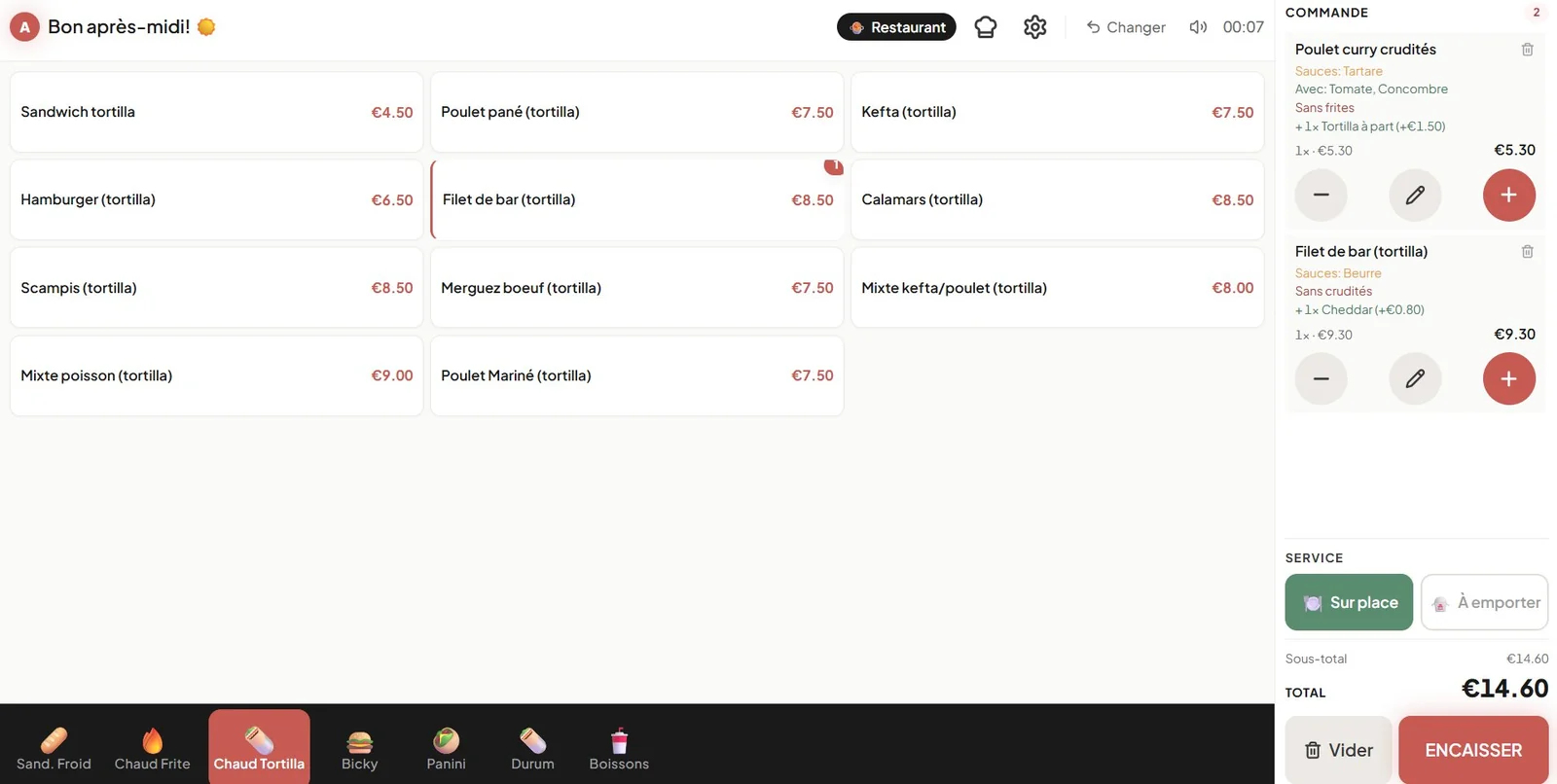
The till runs on a tablet and knows both sales points, each with its own menu. A sale records exactly what was sold, including sauces, extras and "without" choices. For cash there is a change screen: adding up amounts with buttons or a keypad, with the change due running along live. Card payments go over the payment terminal of the shop, which is operated separately; that link does not exist today, and that is a deliberate state of affairs, not an omission.
Clocking is where staff clock in and out. It works on the tablet in the shop, keeps working when the network drops, and delivers the hours that the planning and the wage follow-up further along rely on.
The label system serves the second production flow: the dishes prepared in the morning for delivery to companies. It prints in twelve categories, puts every label in French and Dutch, and derives the use-by date from the category of the product. Allergens and the price marking come straight from the system onto the label.
The stock count runs on the kitchen tablets: counting per zone, flagging missing products, logging the daily bakery deliveries and receiving incoming orders. A signal on the main screen points out products that have gone too long without a check.
The management dashboard is where the business is run. Ten sections, from sales overview and product analysis to stock, purchasing, business orders, staff, planning, punctuality, preparation times in the kitchen and the ratio of wage cost to revenue.
One entry a day, four outcomes
The business delivery starts the same way every day: a grid of clients against products, in which what goes out to each client that day is filled in. That grid is filled in once, and the system derives from it everything that has to happen with it that day.
Production. Out of the grid come the work views for the kitchen: cold sandwiches with their spread of flavours, the hot sandwiches, the dishes and an overview for the chef with the full total to be made. Four views, each for the station where it belongs, ready to print or send on.
Distribution. The same grid is the source for setting the work out: how much must be ready per client, what the product totals are, and what applies separately per client. The system decides nothing about the split; it makes sure whoever carries it out sees the same figures as whoever filled it in.
Bread purchasing. The bread follows from the production. The system works out how many rolls the day needs; from that, what is ordered at which bakery is assigned by hand, and what is left over is the remainder. That remainder is calculated and cannot drop below zero, so a mistake in the assignment shows up straight away instead of carrying through into the order.
Order history. What has been confirmed stays put. Sent orders can be looked back at by month, by supplier, by product and by day, with the amounts excluding and including VAT from the same calculation as the screen. From those come the monthly overviews: as a pdf, as an image or as WhatsApp text, each time with the same figures underneath. Monthly overview and invoice basis.
Whoever fills it in need not know who needs it further along.
Purchasing along two routes
Bread is one of them, and it hangs on the production of that day. The rest of the purchasing works differently: the system looks at what is in stock, what has been used recently and which supplier and category a product belongs to. Anything that drops below the threshold appears in a list "à commander".
That is a proposal and not an order: the system lays out what stands out, and a person decides what is really ordered and sends it.
Two flows, one stock
The two production flows are the heart of why this had to become one system and not a collection of apps. A sale at the counter and a printed label for the business delivery both use the same ingredients, but they leave along different routes.
Both now draw down the same stock, through the same logic on the server side. What has been used is logged with a note of which flow it was, so the dashboard can show sales and production apart without anything being counted twice. Printing a label never waits on the stock admin: the print goes ahead, the deduction follows.
What changed
Product data
Voorheen
Every change to a product went through the developer.
Nu
The owner creates products, takes them off sale, edits the details, moves them to another category and sets the order.
Stock
Voorheen
Sales and production were tracked apart and compared afterwards.
Nu
Both flows draw down the same stock, with the source logged per use.
Hours & planning
Voorheen
Hours were kept by hand and corrected afterwards.
Nu
Staff clock in on the tablet; planning, punctuality and wage follow-up read the same records.
Overview
Voorheen
Paper, Excel and separate steps nobody could take in at once.
Nu
Till, clocking, labels, stock count and admin run on the same backend.
That first card is the most important one, and it can be dated. On 22 and 23 August 2026 the owner created products, took them off sale, reordered them, moved them between categories and edited them, without a developer being involved. That is the difference between a system built for you and a system that is yours.
Estimated
An estimate by Belvi based on the work the system takes over. AFILAL has not measured this, and neither have we.
20hours a month
manual work that no longer has to be done: drawing up order lists, copying hours over, comparing sales with production.
Why it can be trusted
Each part has its own way of going wrong, and the care is matched to that instead of spread evenly everywhere.
The sharpest example is the labels. A label on a tub of food is not a screen you can still edit: if an allergen is missing or a use-by date is wrong, it is printed and it is with the customer. So every variant a label can come out in has been checked instead of a selection, the layout has been verified in the context where it is really printed, and free text for allergens has been replaced by a fixed bilingual word list.
The same reasoning holds elsewhere, with other consequences. The stock deduction is built so that a sale or a print can never block on the admin behind it, and so that the same order cannot deduct twice. What the system does not recognise does not quietly disappear but is set apart, so it can be checked.
Why this holds broadly
What started at AFILAL with separate operational workflows is the same principle we apply at growing companies: enter information once and then let it flow, under control, through the right processes.
To close
A system is only worth something when the people who run the business can build on it. Belvi built the parts around the way work is done at AFILAL, and connected them where that work comes together in practice: at the stock, at the hours and on the screen of the owner.
Figures about the system
- 5
- apps on one shared backend
- 2
- sales points in the same till
- 2
- production flows on the same stock
- 10
- sections in the admin dashboard
- 6
- zones in the stock count
- 2
- languages per label
These are figures about what was built. They are not business results for AFILAL: we make no claim here about revenue or costs.
Beeld
Used
Frequently asked questions